基本框架
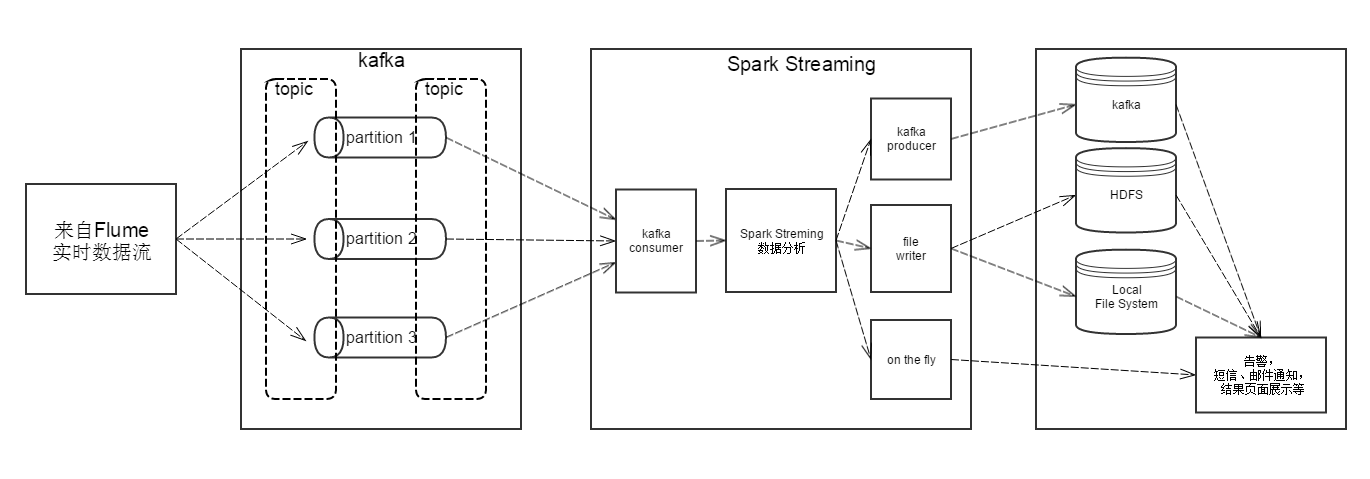
实时数据输入基本上来自Flume的数据采集,通过对应topic存入kafka之中,Spark streaming实时消费对应topic的内容并进行数据分析。分析结果的处理分很多种情况,可以存入kafka,写入HDFS或本地文件以供后续使用,也可以直接将结果展示到页面上,或发送邮件,短信通知。
为什么使用Kafka
框架中在Flume实时数据和Spark Streaming中间加上了一层Kafka,实际上Flume是可以直接和Spark streaming对接,那么为什么要加上Kafka呢。主要原因如下:
- 可靠性: Flume的file channel虽然提供了一定的可靠性,但是file channel其实相当于一个队列,并且容量不是特别大,当spark streaming当掉或sink因为其它原因无法发送数据的时候,file channel积累的数据很可能就会超出限制,导致数据丢失。而Kafka支持PB级的数据存储,在容量上面不用担心。并且Kafka是多节点运行,冗余存储,基本上很难挂掉。
- 低延迟: Kafka和Flume集成可以达到次秒级延时,基本上可以满足需求。
- 扩展性: 使用Kafka可以方便的与其它业务的需求对接(主要在业务端进行Coding,不用改变该框架的基本内容。如果只使用Flume,则需要改动Flume配置,存在一定风险)。
快速搭建Kafka环境
搭建Spark Streaming环境
1. 下载spark binary包
2. 启动Standalone master server
./sbin/start-master.sh
3. 启动Worker
./sbin/start-slave.sh <master-spark-URL>
通过master server的web UI(默认是http://localhost:8080)可以查看详情。
Spark Streaming 示例
官方示例可查看 git_KafkaWordCount
运行以下命令可以检测spark streming和kafka是否能集成使用
./bin/run-example streaming.DirectKafkaWordCount <kafka broker list[host:port]> <topic>
例如:
[localhost@hadoop002 kafka]$ ./bin/run-example streaming.DirectKafkaWordCount localhost:9092,localhost:9093 kafka-test
打开kafka产生端输入数据
[localhost@hadoop002 kafka]$ bin/kafka-console-producer.sh --broker-list localhost:9092 --topic kafka-test
hello world
how are you
可以看见spark streaming输出
[localhost@hadoop002 spark-1.4.1-bin-hadoop2.6]$ ./bin/run-example streaming.DirectKafkaWordCount localhost:9092,localhost:9093 kafka-test
Using Spark's default log4j profile: org/apache/spark/log4j-defaults.properties
15/10/23 17:17:35 INFO StreamingExamples: Setting log level to [WARN] for streaming example. To override add a custom log4j.properties to the classpath.
15/10/23 17:17:36 WARN NativeCodeLoader: Unable to load native-hadoop library for your platform... using builtin-java classes where applicable
-------------------------------------------
Time: 1445591924000 ms
-------------------------------------------

-------------------------------------------
Time: 1445591926000 ms
-------------------------------------------
(hello,1)
(world,1)

-------------------------------------------
Time: 1445591928000 ms
-------------------------------------------
(how,1)
(are,1)
(you,1)
说明搭建好的环境可以正常运行
代码编写
初始化上下文
val sparkConf = new SparkConf().setMaster("local[2]").setAppName("NetworkWordCount")
val streamingContext = new StreamingContext(sparkConf, Seconds(1))
Consumer配置
val topics = "kafka-test"
val topicsSet = topics.split(",").toSet
val brokers = "10.1.2.52:9092,10.1.2.52:9093"
val kafkaParams = Map[String, String]("metadata.broker.list" -> brokers)
val messages = KafkaUtils.createDirectStream[String, String, StringDecoder, StringDecoder](streamingContext, kafkaParams, topicsSet)
数据分析
这里为word count
val lines = messages.map(_._2)
val words = lines.flatMap(_.split(" "))
val wordCounts = words.map(x => (x, 1L)).reduceByKey(_ + _)
producer 配置
    //producer config
    val props = new Properties()
    props.put("metadata.broker.list", "10.1.2.52:9092")
    props.put("serializer.class", "kafka.serializer.StringEncoder")
    props.put("key.serializer.class", "kafka.serializer.StringEncoder")
    props.put("request.required.acks", "1")
    val topic = "producer-test"
    val ip = "10.1.2.52"

    def func = (rdd: RDD[(String, Long)]) => {
      val broadcastedConfig = rdd.sparkContext.broadcast(props)
      rdd.foreachPartition { partitionOfRecords =>
        partitionOfRecords.foreach(r => {
          val producer = new Producer[String, String](new ProducerConfig(broadcastedConfig.value))
          producer.send(new KeyedMessage[String, String]("producer-test", r.toString()))
        })
      }
    }
    wordCounts.foreachRDD(func)